PastaStore plot and map utilities
This notebook shows the PastaStore functionality for quickly plotting time series, or plotting metadata or models (time series locations) on a map.
Content
import pandas as pd
import pastas as ps

import pastastore as pst
from pastastore.datasets import example_pastastore
ps.logger.setLevel("ERROR")  # silence Pastas logger for this notebook
pst.show_versions()
Pastastore version : 1.12.0

Python version     : 3.13.11
Pandas version     : 2.3.3
Matplotlib version : 3.10.8
Pastas version     : 1.12.0
PyYAML version     : 6.0.3
Populate a PastaStore with some data
First we create a Connector and a PastaStore object and add some data to it. We’re using the example dataset to show the PastaStores plot and map methods.
# get the example pastastore
conn = pst.DictConnector("my_connector")
pstore = example_pastastore(conn)

# remove some example data because it's far away
pstore.del_oseries(["head_nb5", "head_mw"])
pstore.del_stress(["prec_nb5", "evap_nb5", "riv_nb5"])
pstore.del_stress(["prec_mw", "evap_mw", "extraction_2", "extraction_3"])
Deleted 2 oseries from database.
Deleted 3 stress(es) from database.
Deleted 4 stress(es) from database.
Maps
PastaStore contains a maps attribute that exposes methods for spatially plotting data contained in our database. There are methods for plotting oseries, stress and model locations and there is also a method for plotting a single model and all the time series it contains. The following sections showcase each of these methods. But a map is not a map without some kind of background. The function PastaStore.maps.add_background_map allows you to add a background map to any axes object. The method is powered by contextily and basically allows users to access some of the great functionality provided by that package. Contextily is not a pastastore dependency but is obviously recommended, and necessary if you want to access the background maps. For a list of possible background maps, consult PastaStore.maps._list_contextily_providers() (see below). We’ll be using a few different background map options in the plots below. The default is OpenStreetMap.Mapnik.
Background maps
# DataFrame of all contextily map providers
providers_df = pd.DataFrame(pstore.maps._list_contextily_providers()).T
providers_df
| url | max_zoom | html_attribution | attribution | name | bounds | variant | apikey | min_zoom | ext | ... | size | time | tilematrixset | TileMatrixSet | tms | detectRetina | apiVersion | subscriptionKey | timeStamp | max_zoom_premium | |
|---|---|---|---|---|---|---|---|---|---|---|---|---|---|---|---|---|---|---|---|---|---|
| OpenStreetMap.Mapnik | https://tile.openstreetmap.org/{z}/{x}/{y}.png | 19 | © <a href="https://www.openstreetmap.org/... | (C) OpenStreetMap contributors | OpenStreetMap.Mapnik | NaN | NaN | NaN | NaN | NaN | ... | NaN | NaN | NaN | NaN | NaN | NaN | NaN | NaN | NaN | NaN |
| OpenStreetMap.DE | https://tile.openstreetmap.de/{z}/{x}/{y}.png | 18 | © <a href="https://www.openstreetmap.org/... | (C) OpenStreetMap contributors | OpenStreetMap.DE | NaN | NaN | NaN | NaN | NaN | ... | NaN | NaN | NaN | NaN | NaN | NaN | NaN | NaN | NaN | NaN |
| OpenStreetMap.CH | https://tile.osm.ch/switzerland/{z}/{x}/{y}.png | 18 | © <a href="https://www.openstreetmap.org/... | (C) OpenStreetMap contributors | OpenStreetMap.CH | [[45, 5], [48, 11]] | NaN | NaN | NaN | NaN | ... | NaN | NaN | NaN | NaN | NaN | NaN | NaN | NaN | NaN | NaN |
| OpenStreetMap.France | https://{s}.tile.openstreetmap.fr/osmfr/{z}/{x... | 20 | © OpenStreetMap France | © <a href="... | (C) OpenStreetMap France | (C) OpenStreetMap c... | OpenStreetMap.France | NaN | NaN | NaN | NaN | NaN | ... | NaN | NaN | NaN | NaN | NaN | NaN | NaN | NaN | NaN | NaN |
| OpenStreetMap.HOT | https://{s}.tile.openstreetmap.fr/hot/{z}/{x}/... | 19 | © <a href="https://www.openstreetmap.org/... | (C) OpenStreetMap contributors, Tiles style by... | OpenStreetMap.HOT | NaN | NaN | NaN | NaN | NaN | ... | NaN | NaN | NaN | NaN | NaN | NaN | NaN | NaN | NaN | NaN |
| ... | ... | ... | ... | ... | ... | ... | ... | ... | ... | ... | ... | ... | ... | ... | ... | ... | ... | ... | ... | ... | ... |
| OrdnanceSurvey.Outdoor_27700 | https://api.os.uk/maps/raster/v1/zxy/Outdoor_2... | 9 | Contains OS data © Crown copyright and dat... | Contains OS data (C) Crown copyright and datab... | OrdnanceSurvey.Outdoor_27700 | [[0, 0], [700000, 1300000]] | NaN | NaN | 0 | NaN | ... | NaN | NaN | NaN | NaN | NaN | NaN | NaN | NaN | NaN | 13 |
| OrdnanceSurvey.Light | https://api.os.uk/maps/raster/v1/zxy/Light_385... | 16 | Contains OS data © Crown copyright and dat... | Contains OS data (C) Crown copyright and datab... | OrdnanceSurvey.Light | [[49.766807, -9.496386], [61.465189, 3.634745]] | NaN | NaN | 7 | NaN | ... | NaN | NaN | NaN | NaN | NaN | NaN | NaN | NaN | NaN | 20 |
| OrdnanceSurvey.Light_27700 | https://api.os.uk/maps/raster/v1/zxy/Light_277... | 9 | Contains OS data © Crown copyright and dat... | Contains OS data (C) Crown copyright and datab... | OrdnanceSurvey.Light_27700 | [[0, 0], [700000, 1300000]] | NaN | NaN | 0 | NaN | ... | NaN | NaN | NaN | NaN | NaN | NaN | NaN | NaN | NaN | 13 |
| OrdnanceSurvey.Leisure_27700 | https://api.os.uk/maps/raster/v1/zxy/Leisure_2... | 5 | Contains OS data © Crown copyright and dat... | Contains OS data (C) Crown copyright and datab... | OrdnanceSurvey.Leisure_27700 | [[0, 0], [700000, 1300000]] | NaN | NaN | 0 | NaN | ... | NaN | NaN | NaN | NaN | NaN | NaN | NaN | NaN | NaN | 9 |
| UN.ClearMap | https://geoservices.un.org/arcgis/rest/service... | NaN | © <a href="https://www.un.org/geospatial/... | United Nations | UN.ClearMap | NaN | NaN | NaN | NaN | NaN | ... | NaN | NaN | NaN | NaN | NaN | NaN | NaN | NaN | NaN | NaN |
890 rows × 36 columns
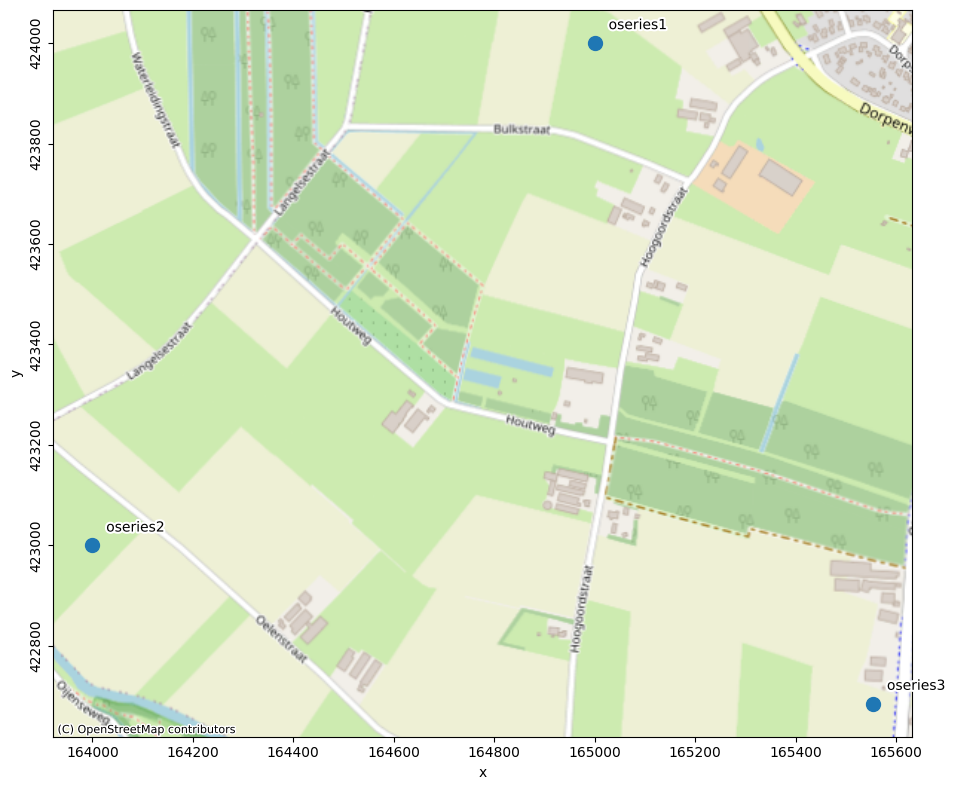
Oseries locations
# plot oseries locations
ax1 = pstore.maps.oseries(labels=True, s=100)
pstore.maps.add_background_map(ax1)
All stresses
pstore.stresses
| x | y | kind | |
|---|---|---|---|
| name | |||
| prec1 | 165050.000000 | 424050.000000 | prec |
| prec2 | 164010.000000 | 423000.000000 | prec |
| evap1 | 164500.000000 | 424000.000000 | evap |
| evap2 | 164000.000000 | 423030.000000 | evap |
| well1 | 164691.000000 | 423579.000000 | well |
| pressure_mw | 123715.757915 | 397547.780543 | pressure |
| extraction_1 | 81985.384615 | 380070.307692 | well |
| extraction_4 | 87111.000000 | 374334.000000 | well |
# plot all stresses locations
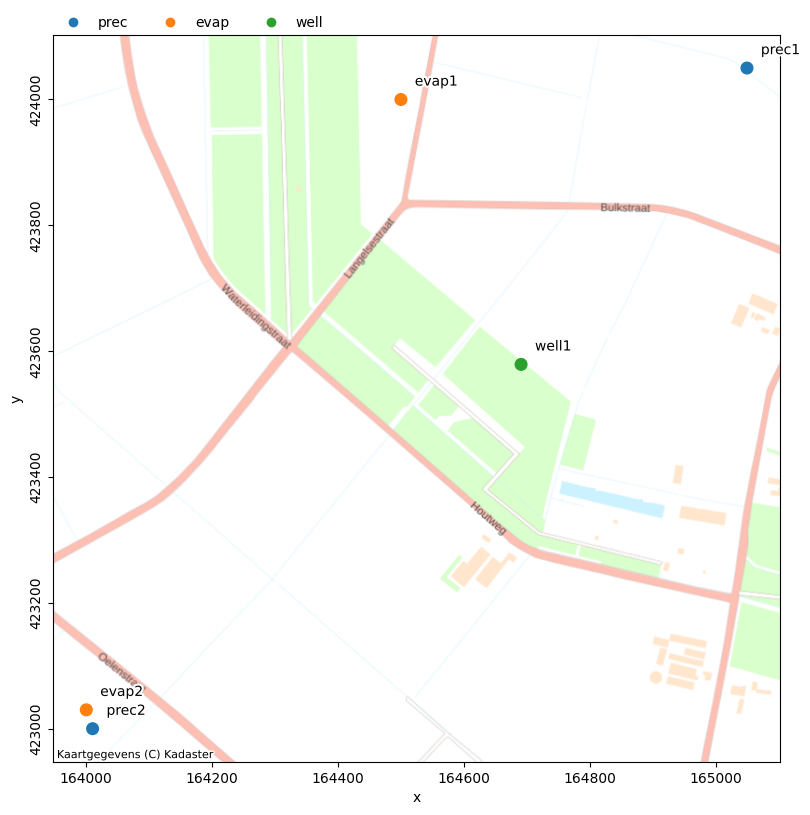
ax2 = pstore.maps.stresses(names=["prec1", "evap1", "well1", "prec2", "evap2"])
pstore.maps.add_background_map(ax2, map_provider="nlmaps.pastel")
Model locations
# create models to show
for o in pstore.oseries.index:
    ml = pstore.create_model(o, modelname=f"{o}_model", add_recharge=True)
    pstore.add_model(ml, overwrite=True)

# plot model location
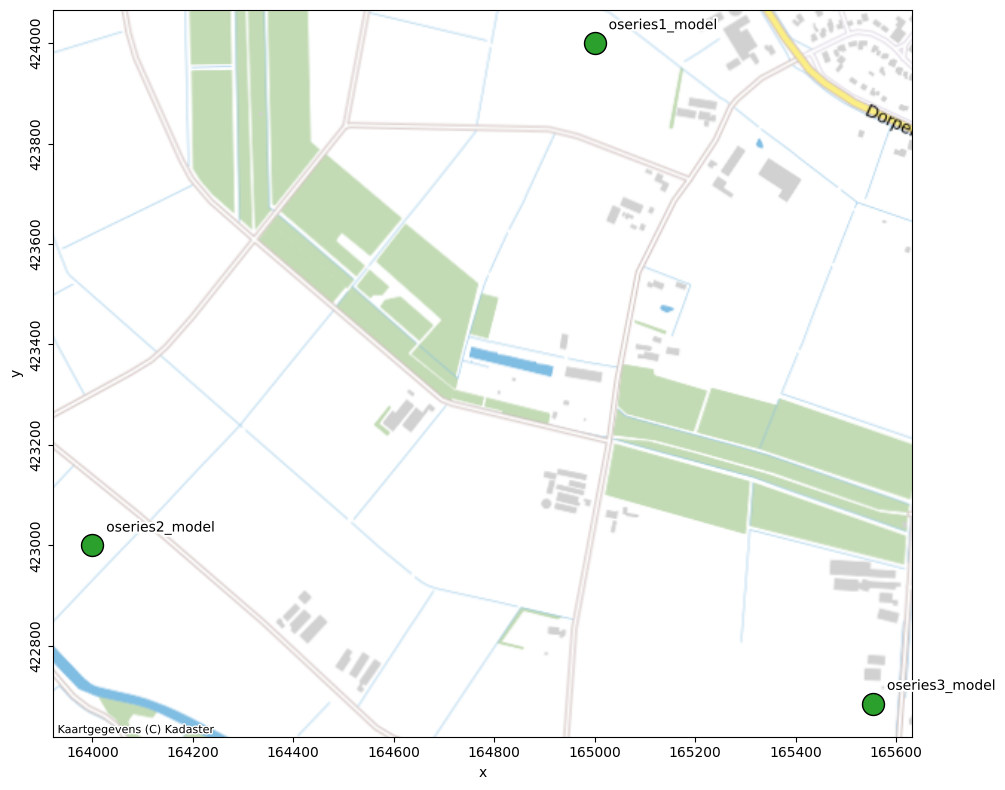
ax3 = pstore.maps.models(color="C2", s=250, edgecolor="k")
pstore.maps.add_background_map(ax3, map_provider="nlmaps.standaard")
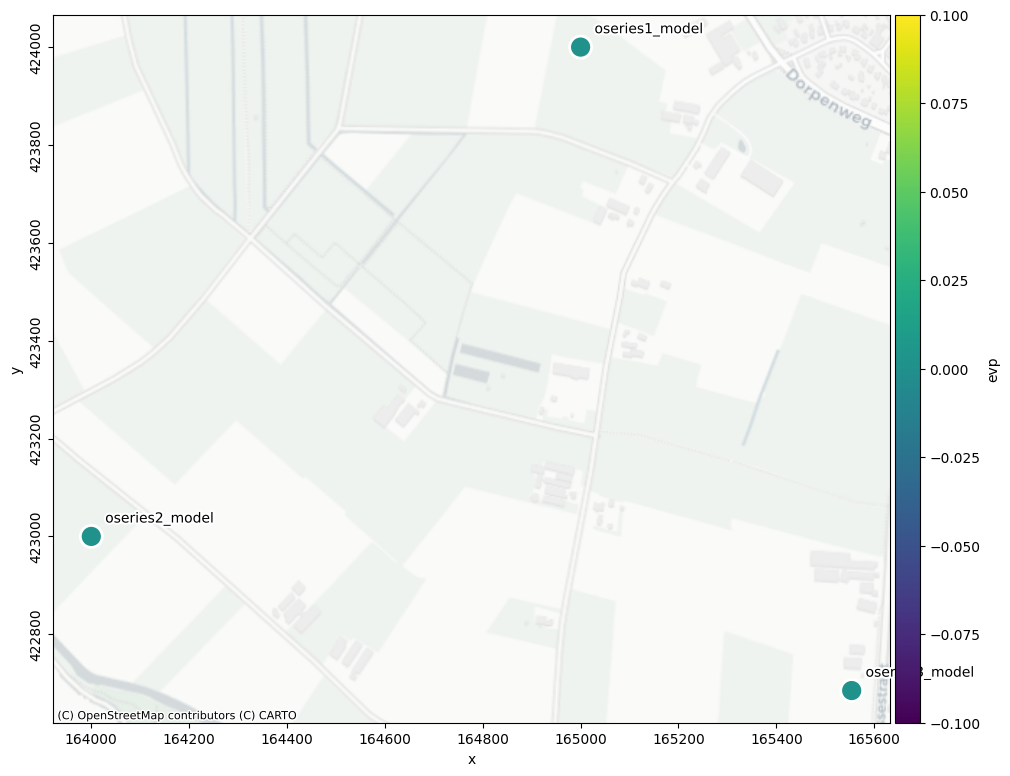
Model statistics
# plot model evp on map
ax4 = pstore.maps.modelstat("evp", s=250, edgecolors="w", linewidths=2)
pstore.maps.add_background_map(ax4, map_provider="CartoDB.Positron")
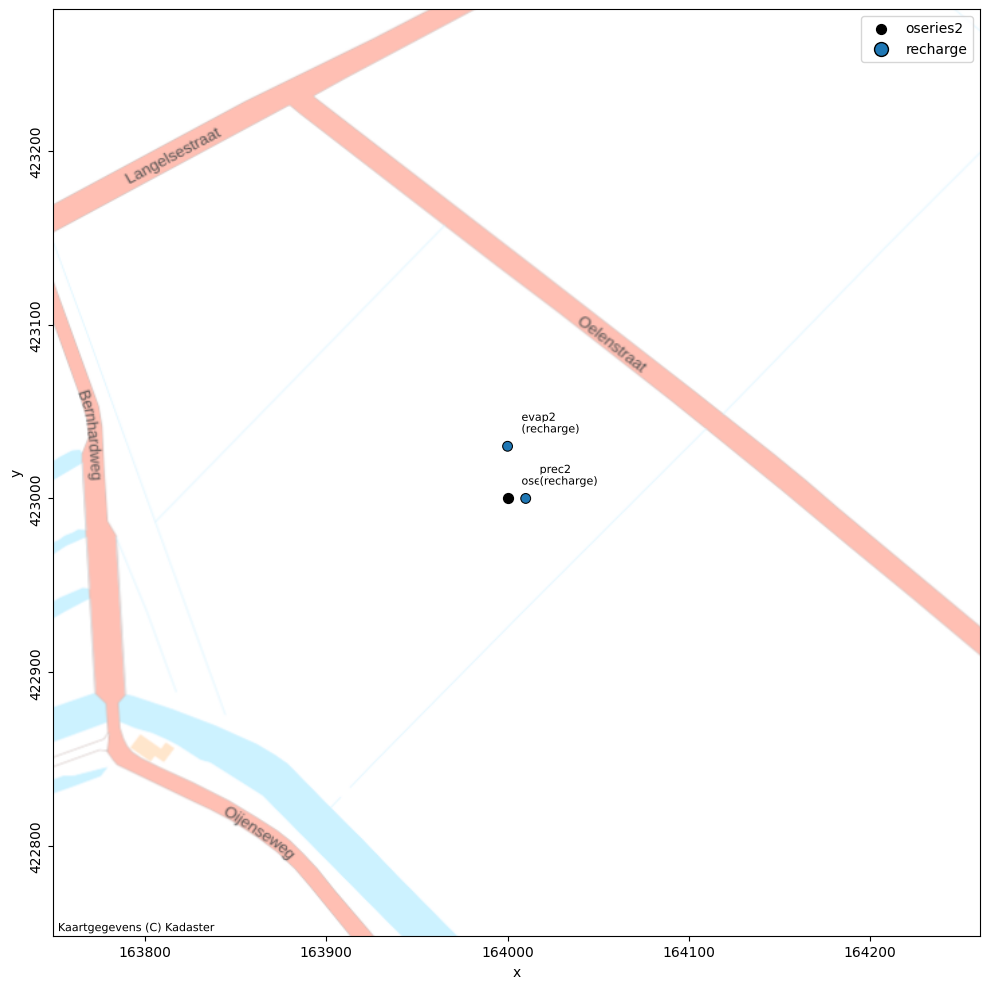
A single model and its time series
# plot one model, oseries and stresses
ax5 = pstore.maps.model("oseries2_model", metadata_source="store", offset=250)
pstore.maps.add_background_map(ax5, map_provider="nlmaps.pastel")
Plots
A PastaStore also has a .plots attribute that exposes methods for plotting time series or an overview of data availability. The examples below run through the different methods and how they work.
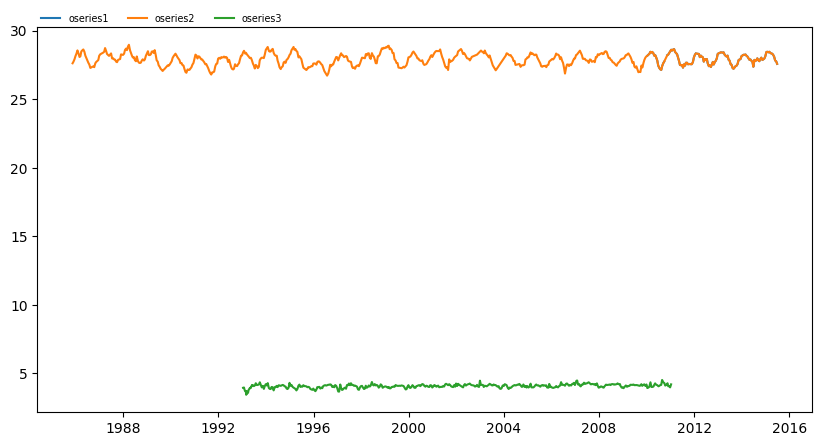
Plot oseries
# plot oseries
ax6 = pstore.plots.oseries()
Plot stresses
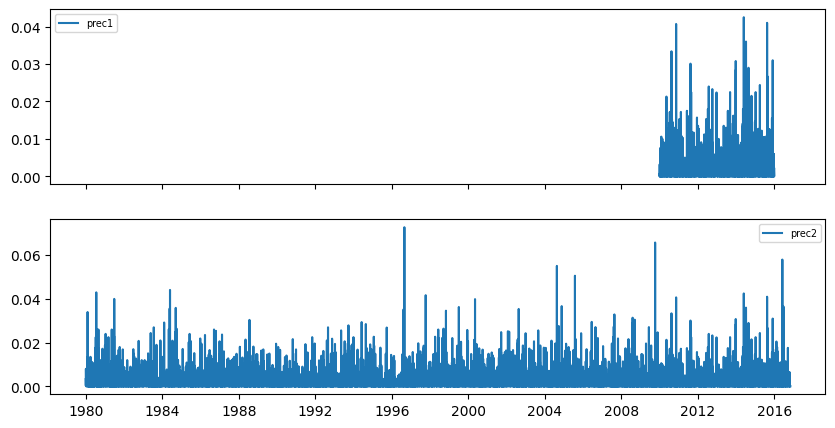
When plotting stresses you can pass the kind argument to select only stresses of a particular kind. The split keyword argument allows you to plot each stress in a separate axis. Note that if there are more than 20 stresses, split is no longer supported.
Also, you can silence the progressbar by passing progressbar=False.
# plot well stresses on separate axes
ax7 = pstore.plots.stresses(kind="prec", split=True, progressbar=False)
Data availability
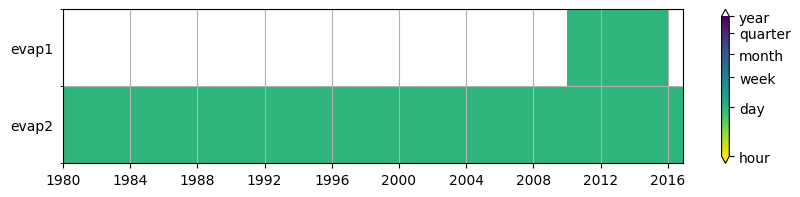
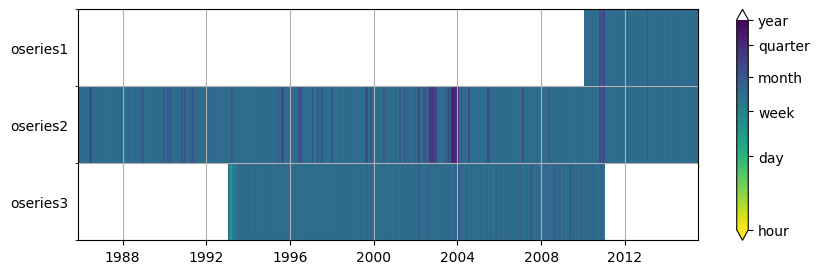
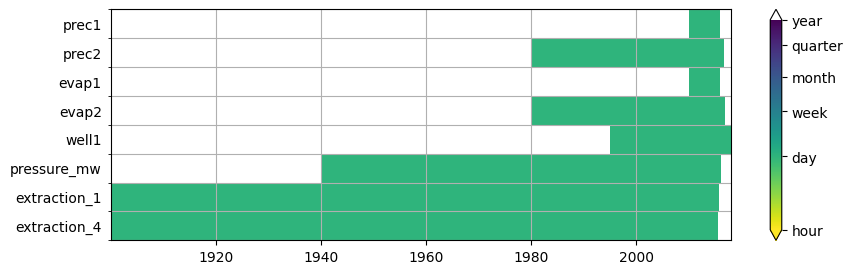
Plotting data availability shows time period for which data is available and also the observation timestep. Below are three examples for oseries, all stresses, and on;y the evaporation stresses. The set_yticks keyword determines whether the names of the time series are used as yticks. This generally works fine if the number of time series isn’t too large, but for large datasets, setting it to False is recommended.
# plot data availability for oseries
ax8 = pstore.plots.data_availability("oseries", set_yticks=True, figsize=(10, 3))
# plot data availability for all stresses
ax9 = pstore.plots.data_availability("stresses", set_yticks=True, figsize=(10, 3))
# plot data availability only stresses with kind="well"
ax10 = pstore.plots.data_availability(
    "stresses", kind="evap", set_yticks=True, figsize=(10, 2)
)